
Download WEJAM APK – music creation app, virtual jamming, music collaboration, real-time music, music game, free music app, create music online, music jamming app, online music session, music app for beginners
Overview
WEJAM is a free music creation app designed for music enthusiasts seeking a dynamic and accessible way to explore musical expression. The app enables users to participate in virtual jam sessions, either solo or in collaboration with others worldwide. It serves as a platform for spontaneous music creation, allowing individuals without formal music training to experiment with melodies, rhythms, and sound layers. The app is particularly suited for beginners, hobbyists, and casual creators who want to engage with music in a fun and interactive way. Whether users are looking to improvise alone or connect with friends and fellow musicians, WEJAM provides a real-time environment for creative exploration. The developer, Wejam Inc., has focused on accessibility and intuitive design, making it easy for users to start creating music immediately. Real-world usage includes informal music practice, social collaboration, and creative experimentation. The app supports both individual expression and shared musical experiences, offering a unique blend of entertainment and artistic engagement. The developer did not provide additional system requirements or details about performance under load.Key Features & Capabilities
- Real-Time Virtual Jamming – Users can join or host live music sessions with others in real time, enabling collaborative music creation across different locations.
- Multi-Instrument Selection – A diverse library of instruments and sounds is available, allowing users to mix and match tones to build unique compositions.
- Loopy Recording Feature – This tool lets users record and layer beats during a session, creating complex tracks by adding new layers on top of existing ones.
- Intuitive Gesture-Based Controls – Adjusting pitch and rhythm is done through simple drag gestures, making it easy to manipulate sound in real time without complex settings.
- Private and Public Jam Sessions – Users can host private sessions using shareable codes or join public ones, supporting both social and personal music experiences.
- Beginner-Friendly Tutorial – A built-in tutorial guides new users through the interface and core functions, reducing the learning curve for first-time users.
User Interface, Workflow & Performance
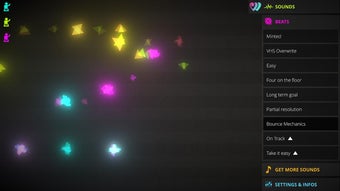
The user interface of WEJAM is clean and visually organized, designed with simplicity in mind. Navigation is straightforward, allowing users to quickly access instruments, session controls, and recording tools. The layout prioritizes core functions, placing essential tools like pitch and rhythm sliders within easy reach. The gesture-based controls enhance workflow efficiency, enabling users to make real-time adjustments with minimal effort. The interface is responsive, and interactions feel immediate, which supports the app’s real-time jamming concept. However, exact performance details were not specified. The developer did not provide information on CPU or RAM usage, so users should expect general behavior typical of lightweight mobile applications. Stability during extended sessions is not documented, but the app’s lightweight design (25MB) suggests efficient resource handling. Performance observations are based on general software behavior patterns. The app does not require complex setup, and the workflow is optimized for quick access to music creation tools.Compatibility & System Requirements
WEJAM is available for Android and iOS devices, making it accessible to a broad range of mobile users. The app is designed to run on modern smartphones and tablets, though specific hardware requirements were not listed. The installation size is 25MB, indicating a lightweight footprint that should not strain device storage. The software version is 1.0.0, and the release date was May 15, 2024. The developer did not specify minimum operating system versions or processor requirements. Compatibility information was partially provided, and users are advised to ensure their device meets standard mobile app requirements. No additional system details were shared, so installation and operation may vary based on individual device configurations.Pros and Cons
Pros
- Free to download and use with optional in-app purchases
- Intuitive, gesture-based interface suitable for beginners
- Real-time collaboration with musicians worldwide
- Extensive sound library with multiple instruments
- Loopy feature enables layered music creation during sessions
- Simple tutorial for onboarding new users
Cons
- Lacks a built-in recording or saving feature for completed sessions
- No official documentation on system requirements or performance
- App size is small, which may limit advanced audio processing capabilities
- Offline functionality is not confirmed
- Dependence on internet connection for real-time collaboration
FAQ Section
Is WEJAM available for both Android and iOS?
Yes, WEJAM is available for Android and iOS devices. The app can be downloaded from official app stores or through the APK file for Android users.
Can I use WEJAM offline?
Offline usage is not confirmed. Since the app relies on real-time collaboration, it likely requires an active internet connection to function properly.
Is WEJAM safe to download?
WEJAM is developed by Wejam Inc. and distributed as a free app. The APK version should be downloaded from trusted sources to ensure security. Always verify the source before installation.
Does WEJAM have in-app purchases?
Yes, while the app is free to download and use, it offers optional in-app purchases to unlock additional instruments and sound packs.
Can I save or export my music sessions?
No, the app does not currently support recording or saving music sessions. Creations are only available during the live session and cannot be preserved afterward.







